
x’s locker / bosun-x
bosun‑x
One page for everything your AI agents are working on. The bosun is the hand who keeps the ship and crew in working order; bosun‑x does that for a set of projects you build with AI: every task board, every handoff between agents, every server and backup, on a dashboard you host yourself, and a record underneath that the next session can pick straight up.
A self-hosted dashboard, plus a command-line tool and an MCP server your agents use, all over the same plain files. MIT, on npm.
npx bosun-x-dashboard --demo # try it on sample data: localhost:3010the problem
If you build software with an AI assistant across more than one project, you know the tax. Every session starts cold — you re-explain what the project is, what’s done, what you were mid-way through, what not to touch. The record drifts: the assistant thinks a task is finished, the code says otherwise. Two assistants in two windows edit the same project, neither aware of the other. A session hits its limit mid-task and the next one has to guess what was already decided.
bosun‑x is the small amount of structure that fixes this — with no database, no web app, and no subscription. If you have one project and one assistant, you probably don’t need it. It earns its place once picking work back up has started to hurt.
how it works
When you start work, you open a handoff. As you go, you checkpoint what’s verified done, where things stand, and the one next action. Two files get written: an append-only log of everything, and a small fixed-size snapshot. The next session reads only the snapshot.
Writes go through one command that holds a per-project lock, so two assistants working the same project take turns instead of clobbering each other — and a checkpoint from the wrong one is rejected outright.
the dashboard
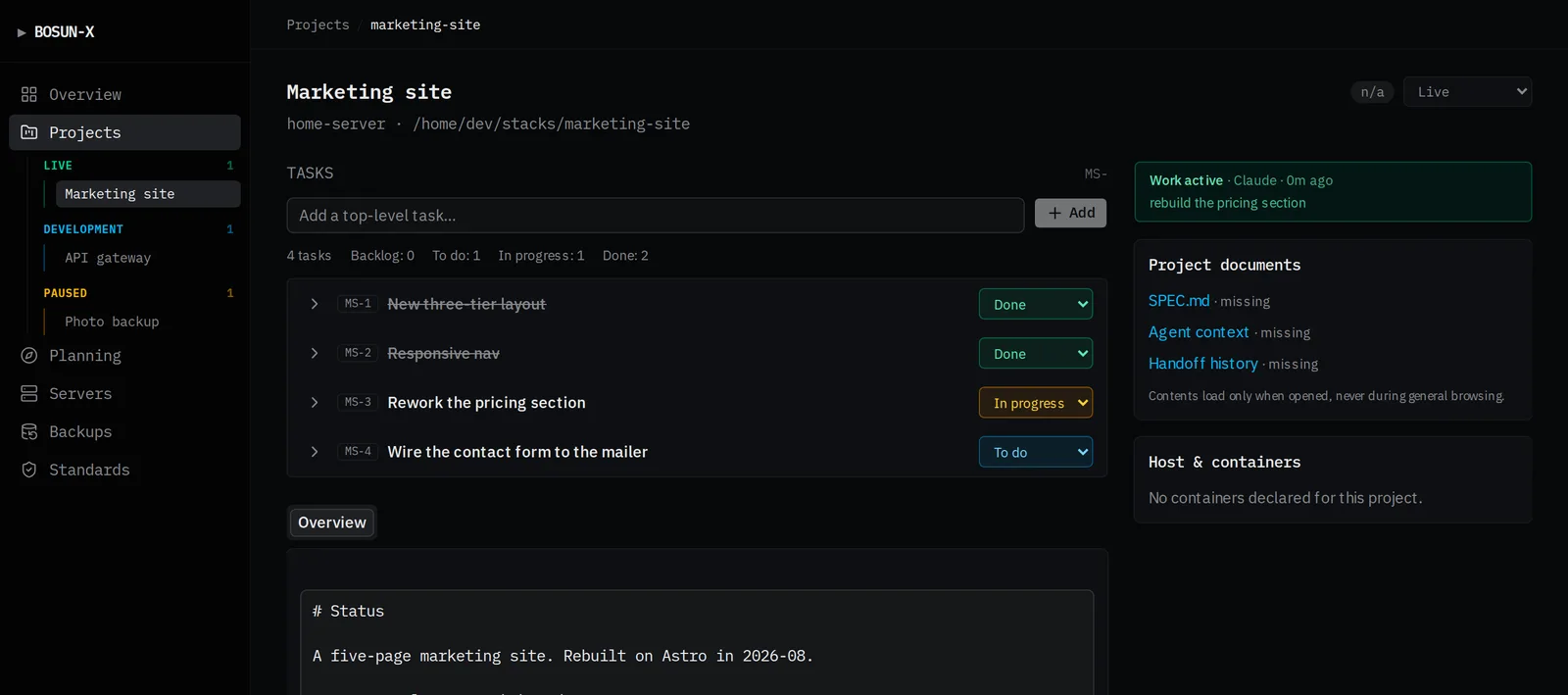
On its own, bosun‑x is a CLI and an MCP server — the engine that keeps the log honest. The dashboard is the web application built on the same plain files: every project’s containers read live off the Docker socket, standards checked rather than claimed, the spec and handoff rendered and editable, the planning lifecycle, backup jobs watched for a missed run with a guided restore and a weekly restore-test for each store, whole servers across a fleet. The CLI is the discipline; the dashboard is where you look at all of it at once.
It’s fully responsive too: the sidebar folds behind a hamburger into an off-canvas drawer on a phone-width screen instead of a permanent desktop-only rail, so jotting a new idea down or checking a task doesn’t have to wait until you’re back at a desk.
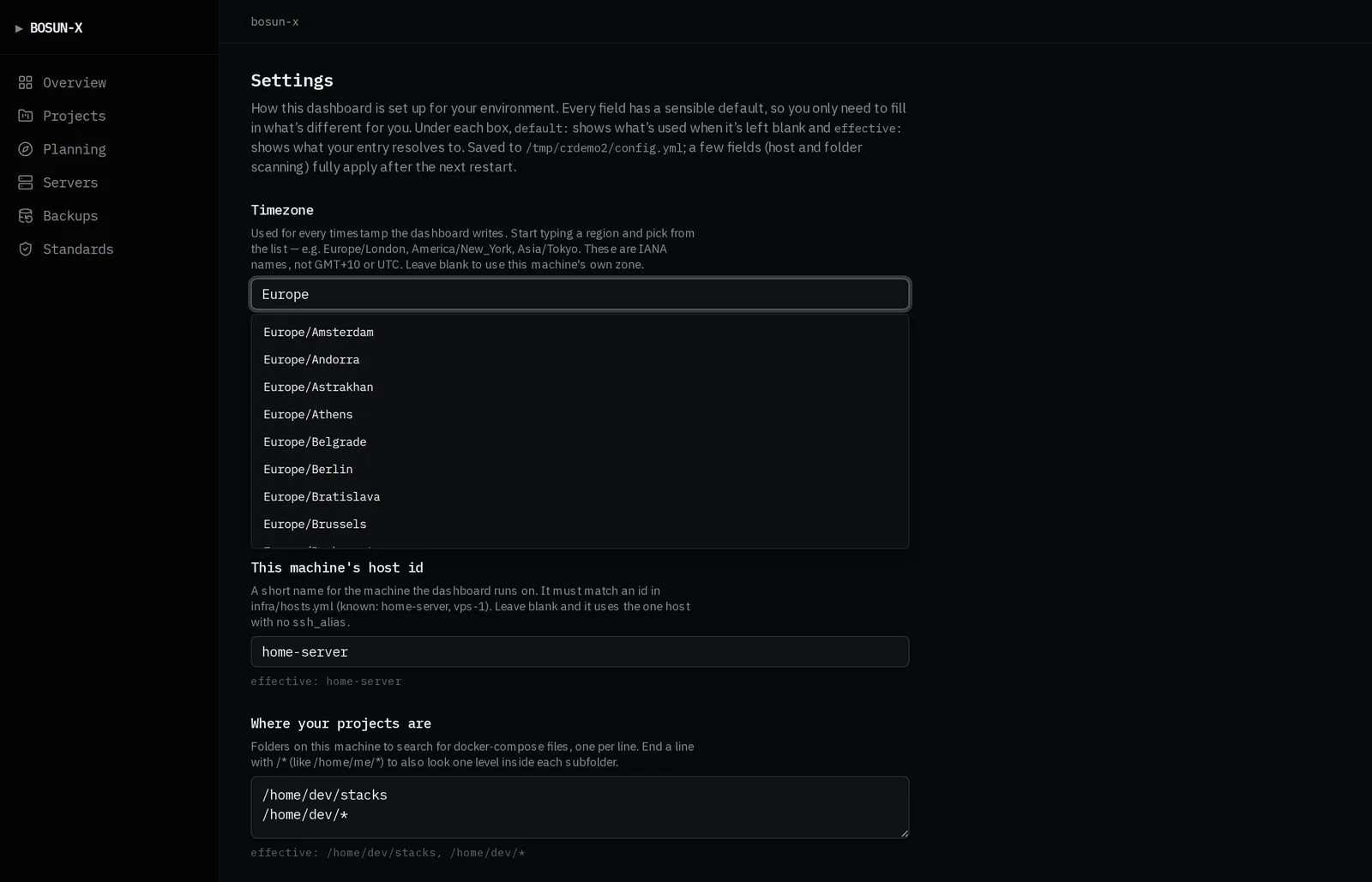
You point it at your own setup from a Settings page — timezone, who can sign in, which machines it watches, where your projects live. Every field has a default and an explanation; nothing is baked into the code.
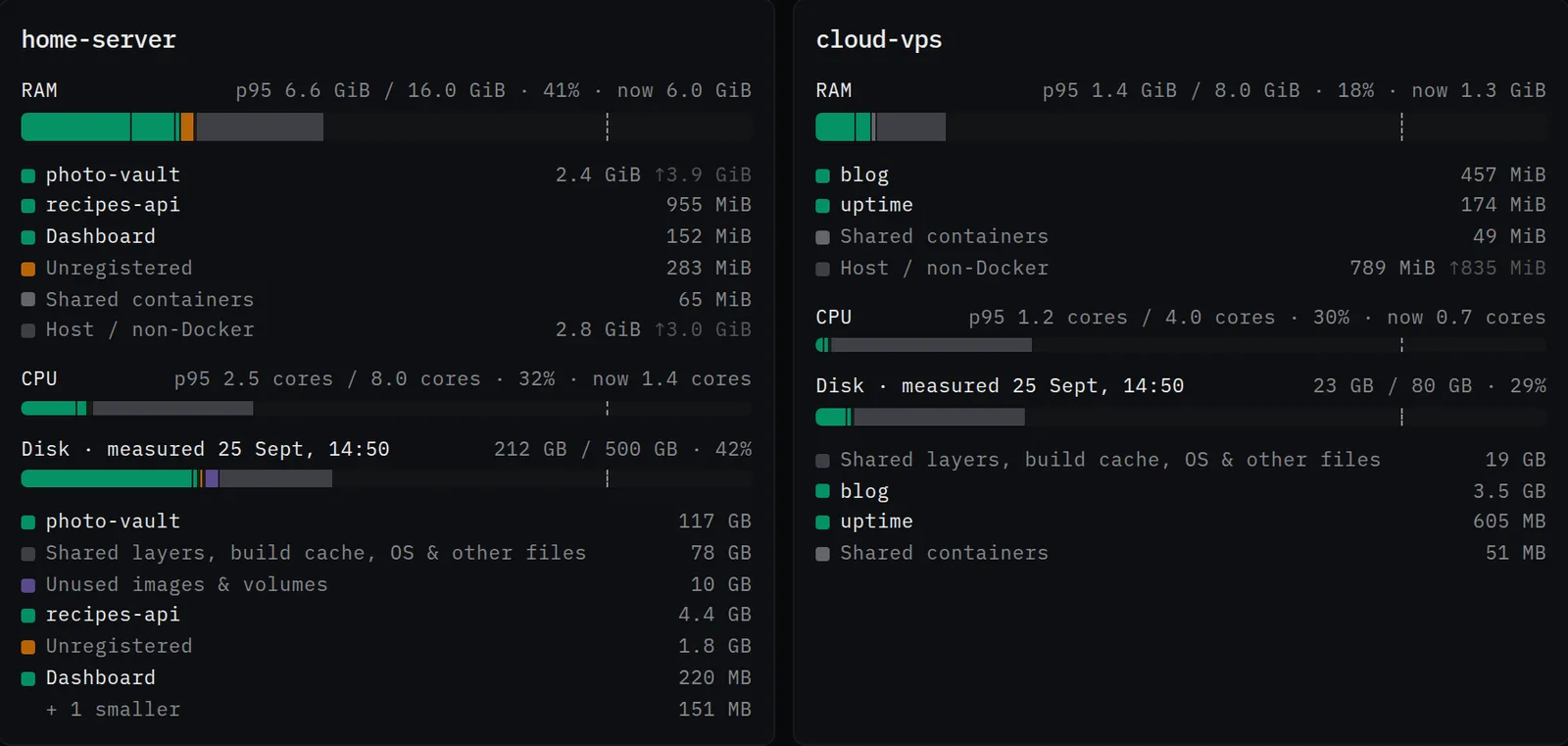
Before a project moves house, weigh it. The Servers page draws every machine’s RAM, CPU and disk as bars the size of the whole box, cut up by project, with a dashed line at 80%. A sampler reads each server every five minutes and keeps two weeks, so once a day of history exists the bars show a busy moment (p95) instead of whatever happened to be true when you looked, and a small arrow flags a peak that runs well above it. Disk is measured once a day: each project’s images, volumes and data folders, with the images and volumes nothing uses marked as reclaimable. It reads sizes, names and paths only. Container environments, where the passwords live, are never read.
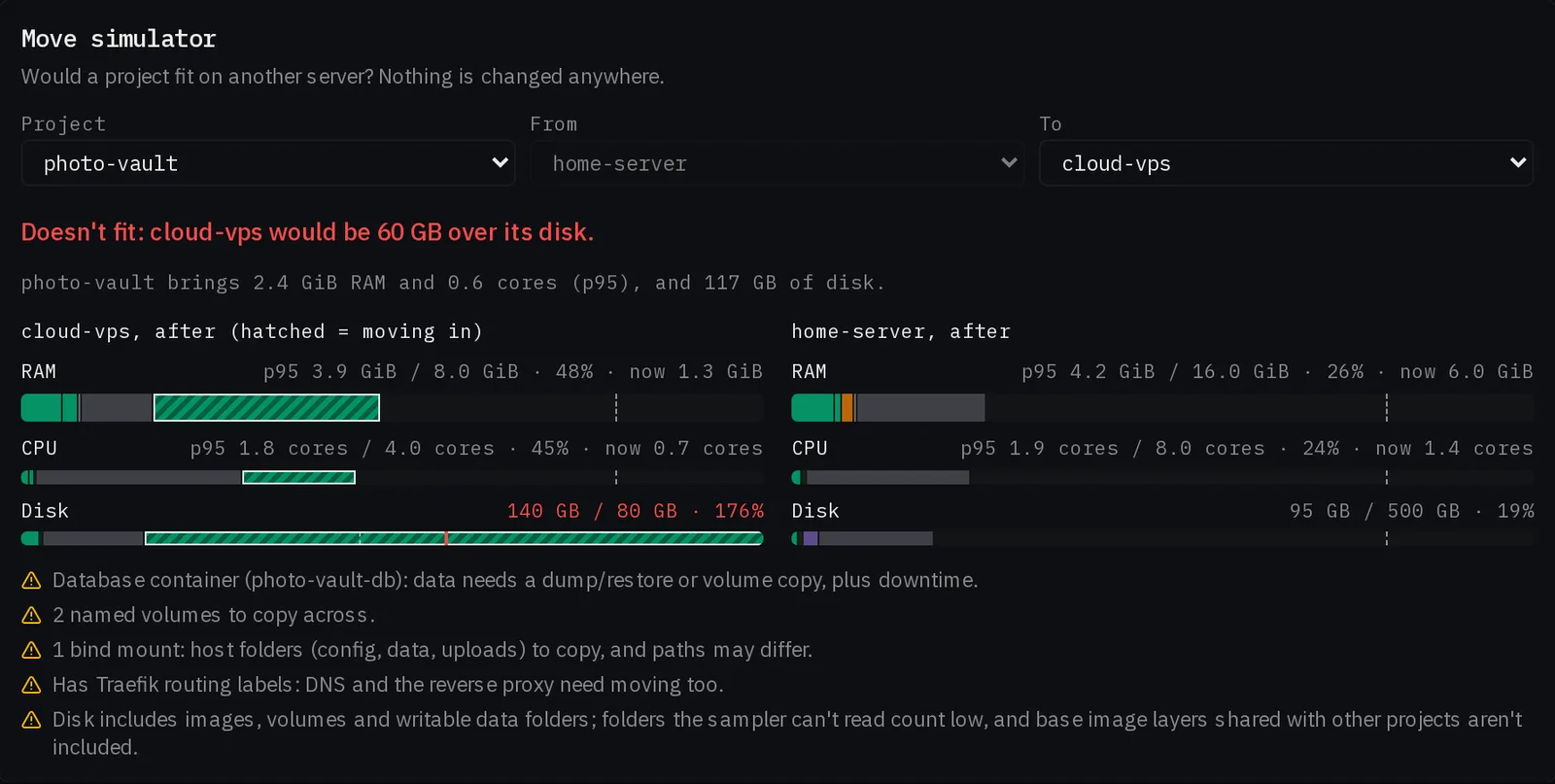
Then ask the question outright. The move simulator takes a running project and a target server and redraws both as they would be after the move: the newcomer hatched on the target, the room it frees on the source, and a verdict of fits, tight or doesn’t fit. It also names the chores that make a move more than a restart somewhere else: a database to dump and restore, volumes and data folders to copy, routing to repoint. It changes nothing. Measure twice, cut once.
The dashboard is open source too — github.com/x-hakt/bosun-x-dashboard. Same shape: plain files, nothing stored,
self‑hosted behind your own auth. Clone it, point a docker compose at
your data folder, done. It uses the CLI above as a dependency.
the client portal
bosun‑x is built for one pair of eyes — one operator who sees every project, every
server, every note. The client portal is how someone you’re
building for gets a window into their own work without seeing anyone else’s. It’s
the same image deployed a second time with BOSUN_MODE=portal, themed as the
client’s own brand, serving a per-client projection of the same plain files.
Nothing is shared by default. A project — or a planning idea — reaches a client only when it passes two gates, and every client-facing page reads through a single function that a lint rule forces it to use.
Sharing is granular. A shared project shows its status and its tech tags, but
every task stays invisible — title and all — until you flag it for that
client, and a project can default to sharing all of its tasks or none. Links are opt-in one
at a time, so a monitoring URL on the same project stays operator-only. A
PORTAL.md in the project folder gives the client a summary in your words in
place of the generated one.
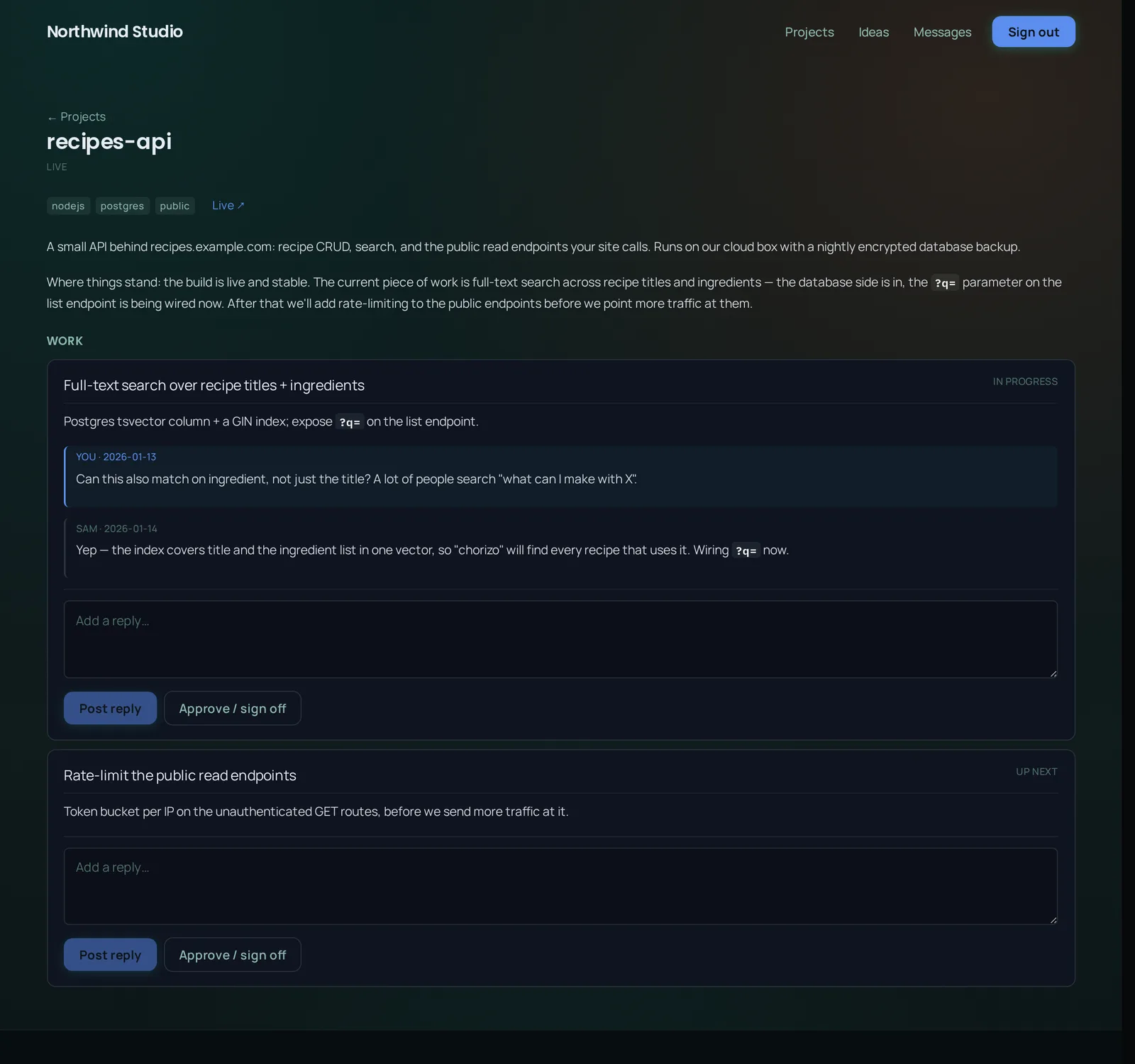
It isn’t read-only. A client can reply into any idea or task thread you’ve shared and post a one-click approve / sign‑off; their replies land back on your side flagged — an amber card in the thread, a “new” badge on the board, a tile on the overview. Separately, every client gets one always-on direct message thread with you, unread badges both ways. The portal home greets a returning client with what moved since their last visit.
You drive all of it from Settings → Client portals: register a portal and
the people in it, then preview the exact projection any one client receives — down to a list
of what’s sitting in their portal that you haven’t shared yet. The build story is
in Two gates and a fence; the setup reference is
docs/portal.md in the dashboard repo.
if you don’t write code
Plenty of people build real apps now without writing the code themselves — they describe what they want and an AI assistant does the typing. If that’s you, bosun‑x is still for you, and you don’t run any of the commands on this page yourself.
You point your assistant at it once:
“Set up bosun‑x for this project — the repo is github.com/x-hakt/bosun-x. From now on, checkpoint your progress as you work, and when I say resume, pick up from the last checkpoint.”
After that, the difference is: you stop re-explaining your project every time you sit down. You open a session and say “resume the pricing page,” and the assistant already knows the three-tier layout is done, the toggle is half-built, and the next job is wiring the prices — because the last session wrote that down in a form the next one can read. You can also ask “what’s the state of everything?” and get a straight list across all your projects.
When you want to see it all, ask the assistant to start the dashboard
(bosun dashboard) and open the address it prints: every project, what was done
last and what’s next, on one page.
It’s a folder of plain text files in your project. Nothing is uploaded anywhere, nothing runs in the background, and you can open any of it in a normal text editor if you ever want to look.
get it
Node 20 or newer. Look before you leap: this runs the dashboard on sample data and keeps nothing.
npx bosun-x-dashboard --demo --openThen for real: install both halves, make a data folder, and open the dashboard over it.
npm i -g bosun-x bosun-x-dashboard
mkdir ~/bosun-data && cd ~/bosun-data
bosun setup                 # timezone, who can sign in, where your projects live
bosun dashboard --open      # localhost:3010
It listens on this machine only, with no sign-in, until you configure one. Adding projects,
wiring your agents, reading other servers, sign-in and running it as a service are all in the
getting started guide.
Prefer containers? The same dashboard ships as an image,
ghcr.io/x-hakt/bosun-x-dashboard.
Run bosun from the folder that holds your project data, or point
$BOSUN_DATA at it. Projects live in <data>/projects/<slug>/.
configure
$BOSUN_DATA | where the projects live (default: the current directory) |
$BOSUN_TZ | timezone for timestamps (default: the system zone). Or timezone in config.yml in the data folder. |
$BOSUN_STALE_MINUTES | when an open handoff is flagged stale (default: 30) |
use it
The loop, once per project:
# starting work
bosun start pricing-page --agent Claude --summary "rebuild the pricing page" --task PP-1

# after every verified milestone, at least every 30 min, and before anything risky
bosun checkpoint pricing-page --agent Claude \
  --done "three-tier layout done, responsive to 360px" \
  --state "the annual/monthly toggle is stubbed, no real prices wired" \
  --next "pull prices from config and wire the toggle" \
  --task PP-2 --tests "visual check at 360/768/1200: clean"

# before you stop
bosun finish pricing-page --agent Claude --done "..." --state "..." --next "..." --task PP-2
On the next session, before touching anything:
$ bosun resume pricing-page

project:       pricing-page
status:        active
agent:         Claude
tasks:         PP-2
checkpoint:    2026-09-01T14:50 (3m ago)
work:          three-tier layout done, responsive to 360px
current_state: the annual/monthly toggle is stubbed, no real prices wired
verification:  visual check at 360/768/1200: clean
next_step:     pull prices from config and wire the toggle

trail (older, newest first):
  - 14:12 Claude: rebuild the pricing page
And to see the whole fleet at a glance, or catch anything that’s drifted:
$ bosun status
pricing-page:  active   · Claude · 3m · PP-2 · three-tier layout done
marketing-api: finished · Codex  · 2d  · shipped rate limiting
docs-site:     stale    · Claude · 5h  · mid-migration to Astro

$ bosun doctor
bosun doctor: all tracked projects are initialized, no drift
wire an AI to it
1. The convention, in the file your assistant reads. From inside a project:
bosun init
adds a short managed block — the checkpoint discipline in a few lines — to whichever of
CLAUDE.md, AGENTS.md, .cursorrules or
copilot-instructions.md is already there.
2. The MCP server, so your assistant has real tools instead of shelling out:
{
  "mcpServers": {
    "bosun-x": {
      "command": "bosun-mcp",
      "env": { "BOSUN_DATA": "/abs/path/to/your/data" }
    }
  }
}
Drop that into Claude Code’s .mcp.json, Claude Desktop’s config, or the same
field in Cursor / Cline / Zed / Codex. It exposes project_brief (the
session-start bundle), list_projects, list_tasks, the handoff
verbs, set_task_status and create_task.
3. The skill (Claude Code) — skill/bosun/SKILL.md in the repo
teaches the discipline and triggers on “resume”, “checkpoint”, “pick up work on”.
under the hood
One directory per project. Every file is meant to be read and edited by hand as comfortably as by the tool — grep is a first-class client.
Anything an incoming assistant reads has a token budget: the snapshot is bounded, the trail is clipped one-liners, and noisy work-in-progress is collapsed into one clean entry before you finish. The full technical reference — every command, the config, the MCP tool list — is in the README on GitHub.